How to Choose a Security Camera - Buyer's Guide
Last updated: 10 Feb 2026
Subscription vs No Subscription, The Biggest Decision
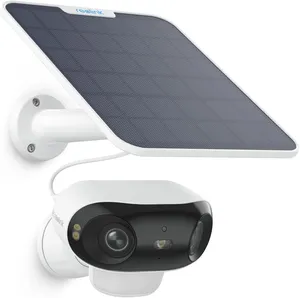
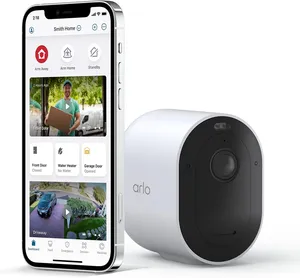
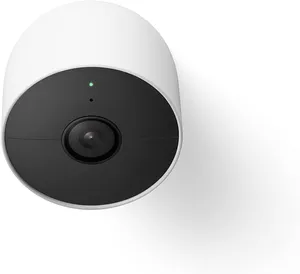
This is the make-or-break decision in security cameras. Subscription models like Arlo and Google Nest Cam require a monthly fee to store footage in the cloud and access features like person detection. No-subscription models like Reolink store footage locally on your own hardware. With subscriptions, you're paying forever, but setup is simple and you don't maintain storage hardware. With local storage, you own your footage completely and pay nothing ongoing, but you need to set up storage hardware yourself. Australian privacy laws mean your footage stays with you legally, so local storage is appealing for privacy-conscious people. However, cloud subscription cameras are easier to use and offer mobile alerts from anywhere. Think about this carefully. If budget is tight, local storage wins. If convenience matters more, subscriptions are worth the cost. Both approaches work fine and have genuine advantages. The choice depends on your priorities, technical comfort level, and privacy concerns.
Resolution: 1080p vs 2K vs 4K Explained
1080p is 1920x1080 pixels. 2K is roughly 2560x1440 pixels. 4K is 3840x2160 pixels. More pixels sound better on paper, but here's the reality: 1080p is fine for most security camera applications. You can identify people, vehicles, and activity clearly enough. 2K adds clarity without massive storage costs. 4K looks beautiful but requires heaps of storage and bandwidth you might not have. For a doorbell or driveway camera, 1080p works perfectly and loads fast on mobile. For a wide-view camera covering your backyard, 2K is worth the step up for better detail. Unless you're monitoring a huge area and need to zoom into details regularly, 4K is overkill. Check what resolution you actually need based on the area you're covering and how far objects will be from the camera. Most people end up happy with 2K for real-world use. Don't pay for 4K just because the spec sheet looks impressive. Storage and bandwidth matter more than you'd think.
Battery vs Wired Power
Battery cameras are wireless, easy to install anywhere, and don't need power outlets nearby. Wired cameras need power cables but never run out of battery power. If you don't have power outlets near where you want a camera, battery is your only choice. Battery life usually runs two to four months depending on activity levels and weather conditions. You'll eventually need to recharge or swap batteries, which is fine if you remember when. Wired cameras run forever without any maintenance but require running cables through walls, which is messy and requires nearby power points. For renters or people who hate installation work, battery is absolutely brilliant. For permanent installations where you have power nearby, wired is more convenient because you never worry about batteries dying. Most people mix both approaches: a battery doorbell camera at the front plus a wired camera under an eave where power is available. This hybrid approach offers good coverage.
Local Storage vs Cloud Storage and Privacy
Cloud storage means your footage goes to company servers, and you access it through an app. Local storage means footage stays on your hard drive or local NAS device you control. Cloud storage is convenient, accessible from anywhere, and offloads the maintenance work to the company. Local storage keeps everything in your control and off external servers. Australian privacy laws don't require cloud storage, so local is legal and increasingly popular. The security angle matters too: footage on remote servers could theoretically be breached, though major companies have good security infrastructure. Footage on your own drive is only as secure as your network and how well you maintain it. I'd lean toward local storage for privacy peace of mind, but if convenience and mobile access matter more, cloud works fine. Many systems support both simultaneously, so you're not locked into one approach. Choose based on your privacy priority and convenience needs.
Smart Home Ecosystem Compatibility
If you've already got smart home devices, check whether the camera integrates with your existing ecosystem carefully. Google Nest cameras work beautifully with Google Home and Android devices everywhere. Arlo plays nicely with Amazon Alexa. Reolink works with most systems but feels more standalone. If you're deep in the Apple ecosystem, your options are limited and frustrating. If you're on Android with Google Home devices, Nest cameras make sense. If you're on Alexa, definitely consider Arlo. If you don't care about integration and just want to view a feed occasionally, really any camera works fine for your needs. Ecosystem compatibility matters if you want voice commands or automatic routines triggered by camera events. Don't overthink this unless you're heavily invested in smart home tech already. A good camera that doesn't integrate perfectly beats a bad camera that integrates well. Focus on picture quality first and foremost always above everything else.
Night Vision and Field of View
Night vision quality varies dramatically between different models and different brands. Some cameras see in complete darkness with infrared. Others produce grainy, low-contrast footage at night. Read reviews specifically mentioning night vision performance and image clarity. A 110-degree field of view covers a decent area. Wider angles (130 to 160 degrees) see more but distort edges. Narrower angles (80 to 100 degrees) see less but show more detail at distance. Doorbell cameras typically have 160-degree fields. Wide-view outdoor cameras often sit around 110 degrees. Think about the distance of objects you want to see clearly at night. A narrow angle helps if you're monitoring a driveway 20 metres away. A wide angle is better for covering your entire front yard and surroundings. Night vision matters if your camera will ever operate in darkness, which most do. Check reviews showing actual night footage, not manufacturer claims about infrared range and performance.
Australian Privacy Laws for Home Cameras
Australian privacy law is straightforward: you can record on your own property. You cannot point a camera at a neighbour's bedroom window or into their yard. You must tell people if you're recording audio. Doorbell cameras pointing at your front door are completely legal. Pointing one directly at your neighbour's front door is dodgy and could cause problems. Back garden cameras are fine as long as they don't look into neighbouring properties. Audio recording has stricter rules. In Victoria and Queensland, you need explicit consent to record audio. In other states, recording someone without consent can breach privacy laws. Most security cameras have audio disabled by default, which is sensible and safe. If you're mounting a camera near property boundaries, angle it to cover your property only. Australia's privacy laws are less strict than Europe's but stricter than some US states. Stick to your own property, keep audio off unless you've got consent, and you're completely fine legally.
My Top Picks
Ready to pick one?
Check out my ranked list with scores, prices, and AU availability.
See the Best Security Cameras