How to Choose a Desktop or Mini-PC - Buyer's Guide
Last updated: 25 Apr 2026
The Form Factor Decision: Mini, Tower, or All-in-One
The desktop form factor decision is more about your physical space and use pattern than about performance. Modern silicon delivers comparable performance across all three form factors at the same money.
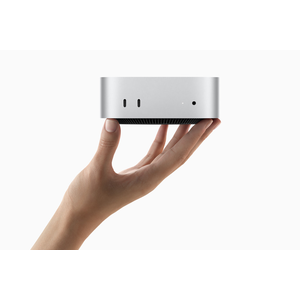
Mini-PC (Mac mini M4, Beelink, Minisforum, Geekom) is a 5x5-inch box that hides behind a monitor or fits in a drawer. The cleanest desk solution. You add your own monitor, keyboard, and mouse. Best for: anyone with limited desk space, anyone who wants visual minimalism, anyone who already owns a monitor and peripherals. Mac mini M4 at $999 is the best-value desktop computer in any form factor in 2026.
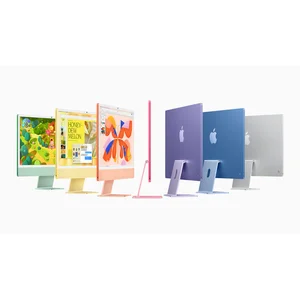
All-in-one (iMac M4) integrates the computer into the back of the monitor. One cable to the wall. Best for: kitchen, family room, or aesthetic-first home offices where the visual matters. Trade-off is when the iMac dies, the display dies with it; on a mini-PC plus separate monitor setup, you can keep the monitor and upgrade the computer.
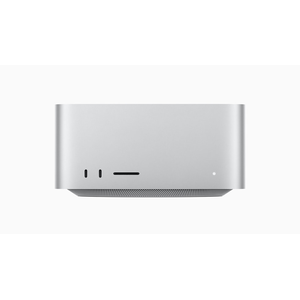
Mid-tower (Mac Studio, Dell XPS Desktop, HP Omen) is the conventional desktop computer in a box that sits on or under your desk. Best for: pro workstation use, gaming, anyone who needs significant compute or GPU power. Easier to upgrade and repair than mini or all-in-one form factors.
Most buyers should default to mini-PC plus a separate monitor (Mac mini M4 plus a 27-inch 4K display at $400-600 is the right answer for $1,400-1,600 total). Move to mid-tower when you need the GPU power or have specific pro workloads. Move to all-in-one when the visual aesthetic genuinely matters and you accept the limited upgrade path.
macOS vs Windows: Same Question as Laptops
The OS choice for desktops follows the same logic as laptops: macOS for Apple-ecosystem buyers and pro creative work, Windows for x86-required workflows, gaming, and broader hardware variety.
macOS desktops are limited to Apple's three lines. Mac mini M4 and M4 Pro for general use ($999-$1,599). Mac Studio M4 Max and M3 Ultra for pro workstation use ($2,999-$5,999). iMac M4 for the all-in-one form factor ($1,999-$2,999). Apple Silicon's unified memory architecture is the actual reason pros choose Mac Studio over a Windows tower with discrete GPU; for ML inference, video colour grading, and certain 3D workloads, having 64GB or 128GB available to GPU compute changes what is possible.
Windows desktops are everything else. Pre-built (Dell XPS Desktop, HP Omen, Lenovo Legion, Acer Predator) at $1,500-$5,000 from major brands. Custom-build options at any price point if you have the skills. Best gaming performance via discrete Nvidia RTX or AMD Radeon GPUs that Apple Silicon does not match. Full x86 software compatibility for legacy enterprise tools.
The M5 Mac Studio, Mac mini, and iMac are expected mid-to-late 2026 (June or October per supply-chain reports). Buyers asking whether to wait should consider current need against the incremental upgrade. The current M4 / M3 Ultra Macs are excellent and will be supported through 2030+.
Pre-Built vs Custom DIY
For Windows desktops, custom-building remains the best per-dollar value at every performance tier above $1,500. A custom build with the same components as a pre-built typically costs 20 to 30 percent less. The trade-off is the time to build (4-6 hours typically), the risk of misassembly, and the need to manage individual component RMA processes if anything fails.
Pre-built buys you: factory warranty (one place to call when anything fails), professional cable management, factory testing, no risk of self-assembly errors, and Dell ProSupport or HP Care Pack on-site service options. For people who do not build, this is fair value. For people who can build, self-build is genuinely better value at every tier.
For Mac buyers, this discussion is moot. Apple does not allow custom builds; pre-built is the only option.
Boutique gaming PC brands (Origin, Maingear, Falcon Northwest, Aetheria) are not officially sold in Australia. Local equivalents include PLE Computers, Centrecom Custom, MSY Custom, and Scorptec. Pricing is usually 10-20 percent above self-build but with the convenience of in-store warranty and service.
Apple Silicon vs Intel vs AMD
The 2026 desktop chip landscape:
Apple M4 / M4 Pro / M4 Max / M3 Ultra (Mac mini, iMac, Mac Studio) leads on perf-per-watt and on the unified memory architecture that pros use. CPU performance is competitive with Intel Core Ultra 9 and AMD Ryzen 9 9950X for typical productivity workloads. GPU performance trails high-end Nvidia RTX in raw compute but wins on macOS-native creative apps that use Metal.
Intel Core Ultra Series 3 (Panther Lake) on the desktop side is the new generation of Intel silicon. Competitive with AMD Ryzen 9 9950X for productivity, slightly behind on heavily multi-threaded loads, slightly ahead on single-threaded.
AMD Ryzen 9 9950X / 9900X3D is the AMD top-end for desktop in 2026. The X3D variants with 3D V-Cache are the gaming performance leaders by 10-20 percent over the standard variants and over Intel. For Windows gaming desktops, AMD X3D is the right answer; for productivity, either Intel or AMD is fine.
Discrete GPU choice: NVIDIA RTX 5060 (entry, suitable for 1080p high), 5070 / 5070 Ti (mid-range, 1440p ultra with DLSS 4), 5080 (high-end, 4K ultra), 5090 (flagship, 4K with ray tracing). AMD Radeon 9070 XT is the AMD equivalent of RTX 5070 and competitive on raw compute but trails on ray tracing and DLSS-equivalent upscaling.
Australian Price Tiers in 2026
Mini-PC tier ($600 to $1,200): Mac mini M4 base ($999), Beelink SER8 with Ryzen 7 ($699), Minisforum NAB6 with Intel Core Ultra 7 ($899), Geekom IT13 ($1,099). All capable of typical office and light creative work. Mac mini wins on macOS access and on long support tail; Windows mini-PCs win on user-upgradable RAM and storage.
Mid-range desktop tier ($1,500 to $2,500): Mac mini M4 Pro ($1,599), iMac M4 ($1,999), Dell XPS Desktop 2026 ($2,499 base), HP Pavilion Desktop. Premium build, expandable in the Windows case, integrated everything in the Mac case.
Pro workstation / Premium gaming ($2,500 to $4,500): Mac Studio M4 Max ($2,999), HP Omen 35L 2026 ($2,799), high-config Dell XPS Desktop, custom-build mid-tower with Ryzen 9 9950X3D plus RTX 5070 Ti. Right tier for buyers who actually use the upgrades daily.
Workstation flagship ($4,500+): Mac Studio M3 Ultra ($5,999 with 96GB RAM, configurable to 256GB), custom-build with RTX 5080/5090 plus 64GB-plus RAM, Dell Precision workstations. Niche tier for buyers with specific large-memory or large-GPU workloads.
Sales matter. Apple Education Store year-round offers 10 percent off. Dell direct runs aggressive promo codes around EOFY (June), Click Frenzy (May, November), and end-of-quarter sales. Lenovo Direct eCoupons run 30-40 percent off Lenovo desktops year-round. JB Hi-Fi, The Good Guys, Officeworks, and Centrecom all run major desktop sales around the same windows. Never pay full RRP for a Windows desktop in Australia.
Where to Buy and ACL Coverage
The ACL's reasonable-durability standard for desktops is generally longer than for laptops because desktops are not subjected to thermal stress from being closed in a bag and travelled with. Mid-range desktops should last 6-8 years; pro workstations 8-10 years.
Apple Store Australia for Mac products: rarely cheapest channel but cleanest warranty path. Education Store offers 10 percent off year-round.
JB Hi-Fi stocks all major brands and is the price leader for most desktop purchases. Best Australian retail service network for tech.
Dell Australia direct usually cheapest for XPS Desktop because of frequent promo codes. Dell ProSupport on-site next-business-day in capital cities is the strongest desktop service network for any Windows brand.
HP Australia direct for Omen and Pavilion lines: aggressive promo codes around major retail events. HP Care Pack on-site is recommended for daily-driver gaming PCs because the alternative (courier collection) is painful for desktop hardware.
Centrecom, MSY, Mwave, Scorptec, PLE Computers are the gaming-specialist retailers with strong Australian service for PC gaming hardware. Custom-build options also available through these channels.
Officeworks, The Good Guys, Harvey Norman all carry mainstream desktops at competitive pricing. Strong ACL claim paths through familiar retailers.
Extended warranties (AppleCare+ for Mac, Dell ProSupport, HP Care Pack, Lenovo Premier Support) overlap with what the ACL gives you for hardware coverage. The genuine reason to buy them is on-site service and faster response times for daily-driver work machines, plus accidental damage cover that the ACL does not give you.
What to Test in the First 30 Days
Desktop defect screening is straightforward because the desktop sits on your desk for the duration of the test.
Display, keyboard, mouse, peripherals. If buying a complete iMac or pre-built with peripherals included, test all immediately. If buying a separate setup, test each component as you assemble.
POST and BIOS. Confirm the desktop boots cleanly to OS within expected time. Slow boot or POST errors are early warnings of hardware issues.
Sustained CPU and GPU load. Run Cinebench R23 multi-thread for 30 minutes (CPU test) and 3DMark Time Spy for the GPU. Watch for thermal throttling, fan noise, surface temperature beyond comfortable. Modern desktops should hit thermal-design-power and stay there; if yours throttles immediately or runs uncomfortably hot, that is a defect.
Memory. Run MemTest86 from a USB stick for at least one full pass (30-60 minutes). Memory defects manifest as random crashes weeks later if not caught early.
Storage. Run CrystalDiskMark to confirm SSD throughput matches spec. Run a full disk health check via vendor tool (Samsung Magician, WD Dashboard, etc.).
Wi-Fi, Bluetooth, ports. Test each. Some pre-built desktops ship with antenna placement issues that show as poor Wi-Fi range.
Peripherals included with iMac. Test Magic Keyboard, Magic Mouse, Magic Trackpad. Apple-bundled peripherals occasionally ship with issues that are easier to swap in the first 30 days.
If any of the above fails in the first 30 days, return for refund or exchange under the retailer's return policy and ACL major-failure rules. Pre-built desktops are particularly important to test early because the integrator's warranty path is the cleanest one.
My Top Picks
Ready to pick one?
Check out my ranked list with scores, prices, and AU availability.
See the Best Desktops and Mini-PCs