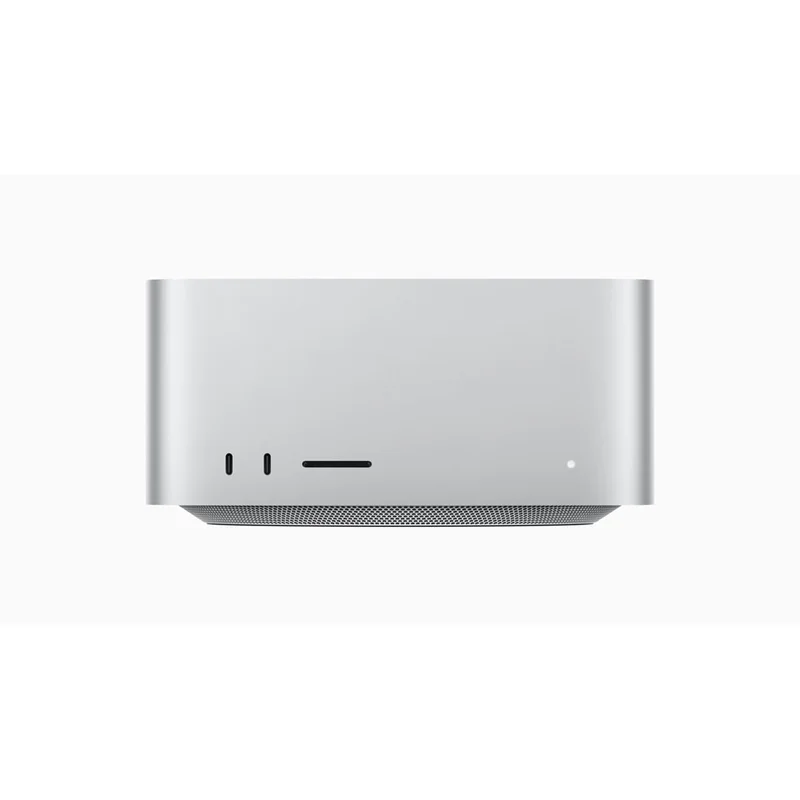
Mac Studio (M4 Max / M3 Ultra)
The compact pro workstation that quietly does the work of a desktop tower. M4 Max base at $2,999 is plenty for almost everyone; M3 Ultra at $5,999 is the answer for buyers who specifically need 64GB-plus unified memory. M5 Mac Studio expected mid-to-late 2026.
RefDat Score Breakdown
| Signal | Score | Weight | Details |
|---|---|---|---|
| Verified Buyer Rating | 4.8/5 (540 reviews) | 30% | Consumer consensus from verified-purchase buyer reviews |
| Community Sentiment | 4.7/5 | 25% | Editorial assessment from OzBargain, Whirlpool, ProductReview |
| Value Score | 4.5/5 | 20% | M4 Max base at $2,999 is excellent value for a pro workstation; M3 Ultra at $5,999 is for buyers who specifically need 64GB-plus unified memory |
| Safety Record | 5.0/5 | 10% | No active ACCC recalls |
| Recency | 4.5/5 | 5% | Released 2025-03-12 |
Last evaluated: 25 Apr 2026
Pros & Cons
What I Like
- Compact 197mm-square form factor fits on any desk; quietly silent under typical workloads
- M4 Max base at $2,999 is genuinely the best value any pro workstation has offered in years
- M3 Ultra option at $5,999 supports up to 256GB unified memory; the only Mac that can
- Four Thunderbolt 5 ports plus 10Gb Ethernet plus front-mounted USB-C and SDXC for camera workflow
- Apple Silicon's unified memory architecture is the actual reason video editors and developers choose this over a Windows tower
Could Be Better
- M5 Mac Studio is expected mid-to-late 2026 (June or October per supply-chain reports); buying now means a 6-12 month wait until refresh
- Display, keyboard, and mouse are all separate purchases; budget another $800-1,500 for a complete setup
- RAM and SSD upgrades happen at purchase only; you cannot upgrade later
- Apple's storage upcharge is brutal at every tier ($300 to go 512GB to 1TB, $600 to go 1TB to 2TB)
My Review
The Mac Studio is the compact pro workstation that does the work of a desktop tower while taking up the footprint of a hardback novel. The M4 Max configuration at $2,999 is the best-value pro Mac Apple has shipped in years, and the M3 Ultra at $5,999 is the only Mac that can be configured with 96GB or more unified memory, which is the spec that earns its keep for the small group of buyers who actually need it.
The form factor is the headline. 197mm square by 95mm tall, weighs 2.74 to 3.63 kilograms depending on chip, and is genuinely silent under typical pro workloads. A video editor working in Final Cut Pro 4K timelines hears nothing. A developer compiling a Swift project hears nothing. The fans only ramp audibly when you push the chip for 30 to 60 seconds at peak compute, and even then the noise is well below a desktop tower with conventional cooling. For an audio-sensitive workspace (podcast recording, music production, voice-over work), this matters in a way no Windows tower can match.
The chip choice is the real decision. The M4 Max at $2,999 starting (with 36GB unified memory and 512GB SSD) is plenty for 90 percent of buyers who would otherwise consider this category. Final Cut Pro 4K, DaVinci Resolve up to 6K, Logic Pro with 100-plus tracks and full plugin chain, Xcode builds with multi-target compilation, photo and video work in Adobe Creative Cloud at any resolution short of 8K. The M4 Max in Mac Studio runs cooler and quieter than the same chip in a MacBook Pro 14 because the chassis has more thermal headroom.
The M3 Ultra at $5,999 (with 96GB unified memory standard, configurable to 256GB) is the answer for buyers who specifically need huge memory pools. Common use cases: large language model inference and fine-tuning that needs 64GB-plus, 8K video editing with multi-stream timelines, complex 3D scenes in Blender or Maya, music production with massive sample libraries, scientific computing workloads. If you cannot name the specific workload that needs 96GB-plus unified memory, you do not need M3 Ultra. M4 Max is the right answer.
The unified memory architecture is the actual reason pros buy this over a Windows tower with a discrete RTX card. On a Windows tower with 64GB system RAM and an RTX 5080 with 16GB VRAM, you have 16GB available to GPU compute. On a Mac Studio M3 Ultra with 96GB unified, you have 96GB available to GPU compute (or CPU compute, or shared between them). For ML inference, video colour grading, and 3D rendering, this changes what is possible at the desktop tier.
The M5 Mac Studio question. Apple's M5-generation Mac Studio is expected mid-to-late 2026 per Bloomberg's Mark Gurman (April 2026 reporting), with original WWDC June launch potentially slipping to October due to supply-chain constraints. Buyers asking whether to wait should consider: the M4 Max chip is plenty for almost any current workload, the M5 Max will be 25-30 percent faster but you will not feel that on workloads the M4 Max already handles in real time. Buy now if you have the work to do; wait if you can defer and want maximum future-proofing.
What you give up. The Mac Studio is just the box. Display ($1,000-2,000 for a Studio Display, more for Pro Display XDR), keyboard ($249 for Magic Keyboard with Touch ID), mouse or trackpad ($129-179) are all separate. Budget another $1,500 to $2,500 for a complete desk setup. The chassis is sealed; RAM and SSD are configured at purchase only and cannot be upgraded. Apple's storage upcharge ($300 to go 512GB to 1TB) is the most annoying part of buying.
The Australian buyer context. Apple Direct is the only channel for built-to-order configs (M3 Ultra with custom RAM/SSD specifically), and Apple Education Store is the year-round price leader for students and teachers (typically $300-500 off the higher configs). JB Hi-Fi stocks standard pre-configured units and is competitive on the M4 Max base. Avoid grey-market US imports because the power supply, keyboard layout, and Australian warranty path all matter on a $3K-plus desktop. Corporate buyers via Datacom or Computers Now can sometimes get bulk pricing that beats Education Store rates.
The trade-off versus the Mac mini M4. The mini at $999 with M4 base or $1,599 with M4 Pro is half the price of a Mac Studio M4 Max and does 60 to 70 percent of the work for typical office and light pro use. The Studio earns its premium only if you genuinely need M4 Max performance and the chassis-quality benefits (silent operation, 4 Thunderbolt 5, front-mounted ports). For most buyers, Mac mini M4 Pro is the right answer.
The trade-off versus a Windows tower at the same price. A custom-build Windows desktop with Ryzen 9 9950X, RTX 5080, and 64GB RAM lands around $3,500-4,000 for self-build or $4,500-5,500 pre-built. Wins on raw GPU performance for gaming, on user-upgradability, and on ecosystem flexibility. Loses on noise (gaming desktops are loud), unified memory (the actual feature pro buyers need), and macOS exclusive software (Final Cut Pro, Logic Pro, the App Store app ecosystem). For pro creative work in macOS, Mac Studio wins. For gaming, the Windows tower wins easily.
Specifications
| Chip Options | ['Apple M4 Max', 'Apple M3 Ultra'] |
| Ram Gb Default M4 Max | 36 |
| Ram Gb Max M4 Max | 128 |
| Ram Gb Default M3 Ultra | 96 |
| Ram Gb Max M3 Ultra | 256 |
| Ssd Gb Default | 512 |
| Ssd Gb Max | 16384 |
| Ports | 4x Thunderbolt 5 (M4 Max) or 4x Thunderbolt 5 (M3 Ultra), 2x USB-A, HDMI, 10Gb Ethernet, SDXC, 3.5mm headphone (front-mounted), 2x USB-C front |
| Wifi | Wi-Fi 6E |
| Bluetooth | 5.3 |
| Dimensions Mm | 197 x 197 x 95 |
| Weight Kg M4 Max | 2.74 |
| Weight Kg M3 Ultra | 3.63 |
| Noise | Effectively silent under typical pro workloads; modest fan ramp under sustained heavy compute |
| Power Max Watts | 270 (M4 Max) / 480 (M3 Ultra) |
| Operating System | macOS Sequoia 15.4 |
Where to Buy in Australia
Under Australian Consumer Law, you have rights to a repair, replacement, or refund if a product has a major problem, regardless of manufacturer warranty. Learn more →
What Australians Say
Common themes from Australian community discussions (OzBargain, Whirlpool, ProductReview):
Mac Studio (M4 Max / M3 Ultra) is ranked in my Best Desktops and Mini-PCs in Australia list. Not sure what to look for? Read my Desktops and Mini-PCs buyer's guide.