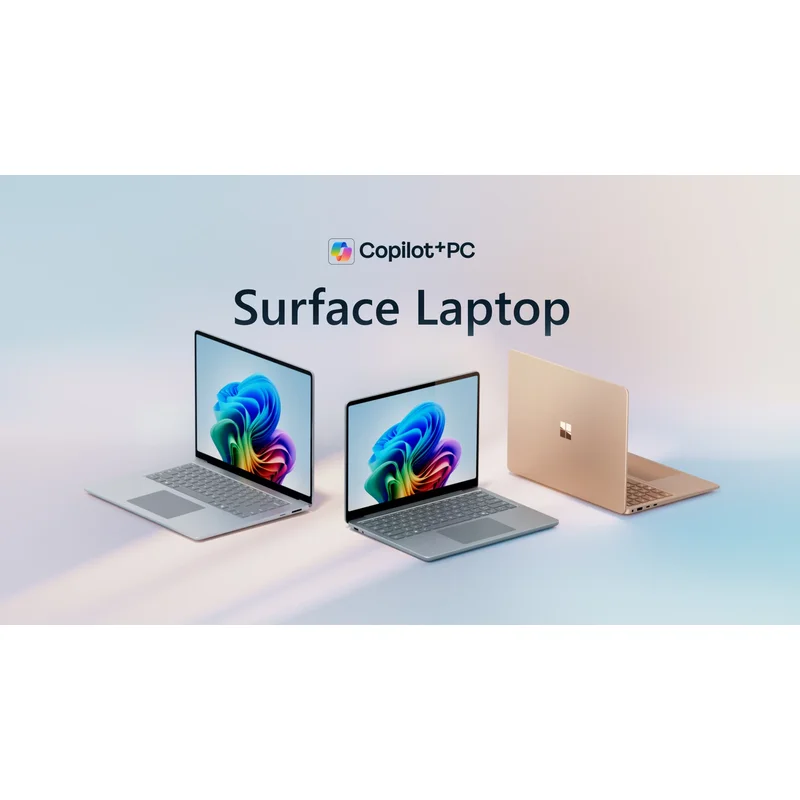
Microsoft Surface Laptop 13.8"
The cleanest Windows laptop you can buy in 2026 and the closest competitor to a MacBook Air. Vanilla Windows 11 with no bloatware, NPU-driven AI features, 3:2 aspect ratio for real productivity, 20hr battery, best webcam in any laptop. The Surface team has finally turned the line into a genuine MacBook alternative.
RefDat Score Breakdown
| Signal | Score | Weight | Details |
|---|---|---|---|
| Verified Buyer Rating | 4.4/5 (740 reviews) | 30% | Consumer consensus from verified-purchase buyer reviews |
| Community Sentiment | 4.5/5 | 25% | Editorial assessment from OzBargain, Whirlpool, ProductReview |
| Value Score | 4.7/5 | 20% | Vanilla Windows 11 with no bloatware, premium hardware, NPU AI features, all at $1,599 starting; the cleanest Windows experience at the price |
| Safety Record | 5.0/5 | 10% | No active ACCC recalls |
| Recency | 4.5/5 | 5% | Released 2025-09-12 |
Last evaluated: 25 Apr 2026
Pros & Cons
What I Like
- Vanilla Windows 11 with zero OEM bloatware, ready for Microsoft 365 out of the box
- 12MP webcam with NPU-driven Windows Studio Effects (auto-framing, eye contact, portrait blur) is the best laptop webcam in production
- 3:2 aspect ratio gives noticeably more vertical space for menus and ribbons in Office, a real productivity upgrade over 16:10
- PixelSense Motion Flow display at 120Hz with variable refresh rivals OLED at typical brightness
- Large precision haptic touchpad and the cleanest non-Apple keyboard in the premium category
- Copilot+ PC certification means on-device NPU inference for Live Captions, Recall (when enabled), and Studio Effects without cloud round-trips
Could Be Better
- ARM Windows still has app-compatibility gaps; some legacy x86 software runs in emulation slowly
- Adobe Creative Cloud apps now have native ARM builds but Premiere Pro still falls back to x86 emulation
- No discrete GPU option; not for gaming or sustained creative workloads
- Surface Connect proprietary charging connector is dumb in 2026 when USB-C PD exists
- Microsoft's repair network in Australia is improving but still behind Apple and Dell for response time
My Review
The Surface Laptop 13.8 is the cleanest Windows laptop you can buy in Australia in 2026, and the closest thing Microsoft has ever shipped to a genuine MacBook alternative. The third generation of Snapdragon-based Surface Laptops is the one where the ARM Windows transition stops being an asterisk for everyday buyers. For office workers, students, writers, anyone who lives in Microsoft 365, this is the laptop that does the job without making you fight your computer.
The most under-rated spec is the one almost nobody mentions in spec-sheet reviews. The 13.8-inch PixelSense Motion Flow display runs a 3:2 aspect ratio rather than the 16:10 most laptops use. That sounds like trivia. In practice it gives you noticeably more vertical space, which is the dimension that matters when you are working in Word, Excel, Outlook, or any browser-based productivity tool. The ribbon menu in Microsoft 365 eats vertical pixels; a 3:2 panel gives you back the row or two you would otherwise lose. After a week on a 3:2 Surface, going back to a 16:10 laptop feels cramped. The display itself is class-leading: 120Hz refresh with variable rate (drops to 60Hz on static content for battery), 600 nits typical, full sRGB calibrated out of the box, and the resolution-to-size ratio matches a Retina display closely enough that the difference is mostly philosophical.
The other under-rated feature is what Microsoft did not include. Vanilla Windows 11 means no McAfee trial, no Dell Customer Connect, no Lenovo Vantage, no HP Wolf Security pop-ups, no random web link tiles in the Start menu. The OS opens to a clean state, asks you to sign in with your Microsoft account, and does not interrupt you with bloatware on first boot. The contrast with a generic $1,200 Windows laptop is night and day. For Microsoft 365 buyers especially, the Outlook, Teams, and OneDrive integration just works because the OS is the reference Windows install.
The Snapdragon X Plus is the second-generation Qualcomm chip in the Surface line, with 10 cores rated for around 80 watts of sustained CPU performance, integrated Adreno graphics, and a 45-TOPS NPU that puts the Laptop into the Copilot+ PC tier. CPU benchmarks land within 5 to 10 percent of the M5 in productivity work. Battery life is roughly 20 hours of video playback or 16 hours of mixed web work, near-identical to what Apple Silicon delivers. Under typical use the fan rarely spins audibly.
The Copilot+ PC features are the new generation of laptop AI. The 12MP webcam runs Windows Studio Effects on the on-device NPU, not in the cloud. That gives you AI-driven automatic framing (the camera follows you around the frame), eye contact correction (you look at the camera even when you are looking at the screen), portrait background blur, and voice noise suppression. For anyone doing several hours of video calls a day, this is a genuine productivity feature, and Apple has no equivalent in macOS Sequoia 2026. Live Captions translate audio in real time on-device. Recall (where enabled) is the optional always-on screenshot indexer that Microsoft has finally shipped with the privacy controls people demanded. The NPU also accelerates image generation in Copilot and Paint, and is starting to be used by third-party apps for things like Adobe's local generative fill.
The large precision haptic touchpad is the third hardware win and the part that Surface buyers consistently call out as the most MacBook-like feature. It is the closest a Windows laptop has come to the click-anywhere force-touch behaviour of a MacBook trackpad, and it ranks ahead of any Lenovo or Dell trackpad in production.
The ARM Windows compatibility question. In 2024 this was a real concern. In 2026, for office work, it largely is not. Microsoft 365, Edge, Chrome, Teams, Slack, Notion, Spotify, all the obvious apps run natively on ARM and run well. Adobe Creative Cloud's Photoshop, Lightroom, and Illustrator have native ARM builds. Premiere Pro is still x86-emulated and runs around 30 percent slower than on an x86 machine. Niche creative tools (some plugins, some legacy enterprise software, some games) still have gaps. Office workers will not notice. Heavy video editors and gamers will. Check your specific app stack on Microsoft's ARM compatibility list before you buy.
Repairability is the under-reported turnaround story. The original Surface Pro era was infamous for 1/10 iFixit scores and devices that had to be replaced wholesale if anything broke. The current Surface Laptop 13.8 sits at around 7 to 8 out of 10 on iFixit. SSD, battery, keyboard, display, ports are all serviceable through Microsoft's Self Service Repair programme, which has been live in Australia since 2025 with genuine parts orderable direct from Microsoft. This is the kind of multi-year improvement that signals the product team actually listened to repair-community criticism.
What it gives up. Compared to the MacBook Air M5 13, the Surface is around $200 cheaper but the macOS ecosystem advantage for creative apps (Final Cut, Logic, the integration with iPhone and iPad) remains real. Compared to the Dell XPS 14 2026 or the ThinkPad X1 Carbon Gen 14, the Surface is half the price and around 80 percent of the chassis premium feel; trades off raw x86 performance, port count, and Dell's faster on-site service network. Compared to a $1,200 generic Windows laptop, the Surface is $400 more for genuine premium build, premium webcam, the 3:2 display, and a vanilla Windows install. That premium is the cleanest $400 you will spend on a Windows laptop in 2026.
The Australian buyer context. JB Hi-Fi is consistently the price leader on Surface in Australia, often $100 to $200 below Microsoft Direct. Officeworks runs occasional end of financial year (EOFY) promotions that match. Microsoft Complete at $349 buys 3 years of cover including accidental damage and is genuinely worth it for any buyer who carries the laptop daily.
The verdict. For a Microsoft 365 buyer in 2026 who is not committed to x86 for niche apps, the Surface Laptop 13.8 is the right call at $1,599. The 3:2 display, the NPU AI features, the haptic trackpad, the bloat-free Windows install, the genuine 20-hour battery, and the best webcam in any laptop are the wins. The trade-offs (some ARM app gaps, no discrete GPU) matter only if they actually affect your stack. Most office buyers find they do not.
Specifications
| Chip | Qualcomm Snapdragon X Plus (10-core) |
| Graphics | Qualcomm Adreno (integrated) |
| Ram Gb Default | 16 |
| Ram Gb Max | 32 |
| Ssd Gb Default | 256 |
| Ssd Gb Max | 1024 |
| Display Inches | 13.8 |
| Display Resolution | 2304 x 1536 |
| Display Aspect Ratio | 3:2 |
| Display Refresh Hz | 120 |
| Display Refresh Variable | True |
| Display Technology | PixelSense Motion Flow touchscreen, 600 nits typical, variable refresh rate |
| Battery Hours Video | 20 |
| Battery Hours Web | 16 |
| Weight Kg | 1.34 |
| Thickness Mm | 17.5 |
| Ports | 2x USB-C (USB 4), 1x USB-A 3.2, Surface Connect, 3.5mm headphone |
| Wifi | Wi-Fi 7 |
| Bluetooth | 5.4 |
| Fanless | False |
| Active Cooling | True |
| Webcam | 12MP with Windows Studio Effects (NPU-driven AI framing, eye contact, background blur) |
| Touchpad | Large precision haptic touchpad |
| Npu Tops | 45 |
| Copilot Plus Pc | True |
| Colours | ['Platinum', 'Sapphire', 'Black', 'Dune'] |
| Operating System | Windows 11 Home (ARM), vanilla install with no OEM bloatware |
Where to Buy in Australia
Looking for the cheapest price in Australia? The figure below is the latest eBay AU price I last resolved on 27 Jul 2026. Prices move often, so check before you buy.
Under Australian Consumer Law, you have rights to a repair, replacement, or refund if a product has a major problem, regardless of manufacturer warranty. Learn more →
Price History
| Date | Price | Change |
|---|---|---|
| 2026-05-30 | $2199 | |
| 2026-05-31 | $2199 | No change |
| 2026-06-01 | $2199 | No change |
| 2026-06-02 | $2199 | No change |
| 2026-06-03 | $2199 | No change |
| 2026-06-04 | $2199 | No change |
| 2026-06-05 | $2199 | No change |
| 2026-06-06 | $2199 | No change |
| 2026-06-07 | $2199 | No change |
| 2026-06-08 | $2199 | No change |
| 2026-06-09 | $2199 | No change |
| 2026-06-10 | $2199 | No change |
| 2026-06-11 | $2199 | No change |
| 2026-06-12 | $2199 | No change |
| 2026-06-13 | $2199 | No change |
| 2026-06-14 | $2199 | No change |
| 2026-06-15 | $2199 | No change |
| 2026-06-16 | $2199 | No change |
| 2026-06-17 | $2089.05 | ↓ $109.95 |
| 2026-06-18 | $2089.05 | No change |
| 2026-06-19 | $2089.05 | No change |
| 2026-06-20 | $2089.05 | No change |
| 2026-06-21 | $2089.05 | No change |
| 2026-06-22 | $2089.05 | No change |
| 2026-06-23 | $2089.05 | No change |
| 2026-06-24 | $2089.05 | No change |
| 2026-06-25 | $2089.05 | No change |
| 2026-06-26 | $2089.05 | No change |
| 2026-06-27 | $2089.05 | No change |
| 2026-06-28 | $2089.05 | No change |
| 2026-06-29 | $2089.05 | No change |
| 2026-06-30 | $2089.05 | No change |
| 2026-07-01 | $2089.05 | No change |
| 2026-07-02 | $2199 | ↑ $109.95 |
| 2026-07-03 | $2199 | No change |
| 2026-07-04 | $2199 | No change |
| 2026-07-05 | $2199 | No change |
| 2026-07-06 | $2199 | No change |
| 2026-07-07 | $2199 | No change |
| 2026-07-08 | $1908.98 | ↓ $290.02 |
| 2026-07-10 | $1912.39 | ↑ $3.41 |
| 2026-07-11 | $2199 | ↑ $286.61 |
| 2026-07-12 | $2199 | No change |
| 2026-07-13 | $1908.25 | ↓ $290.75 |
| 2026-07-14 | $1910.16 | ↑ $1.91 |
| 2026-07-15 | $1900.52 | ↓ $9.64 |
| 2026-07-16 | $1913.85 | ↑ $13.33 |
| 2026-07-17 | $1907.26 | ↓ $6.59 |
| 2026-07-18 | $1906.86 | ↓ $0.40 |
| 2026-07-19 | $2199 | ↑ $292.14 |
| 2026-07-20 | $2199 | No change |
| 2026-07-21 | $2199 | No change |
| 2026-07-22 | $1872.89 | ↓ $326.11 |
| 2026-07-23 | $1873.28 | ↑ $0.39 |
| 2026-07-24 | $1872.37 | ↓ $0.91 |
| 2026-07-25 | $1871.09 | ↓ $1.28 |
| 2026-07-26 | $2199 | ↑ $327.91 |
| 2026-07-27 | $2199 | No change |
What Australians Say
Common themes from Australian community discussions (OzBargain, Whirlpool, ProductReview):
Microsoft Surface Laptop 13.8" is ranked in my Best Laptops in Australia list. Not sure what to look for? Read my Laptops buyer's guide.