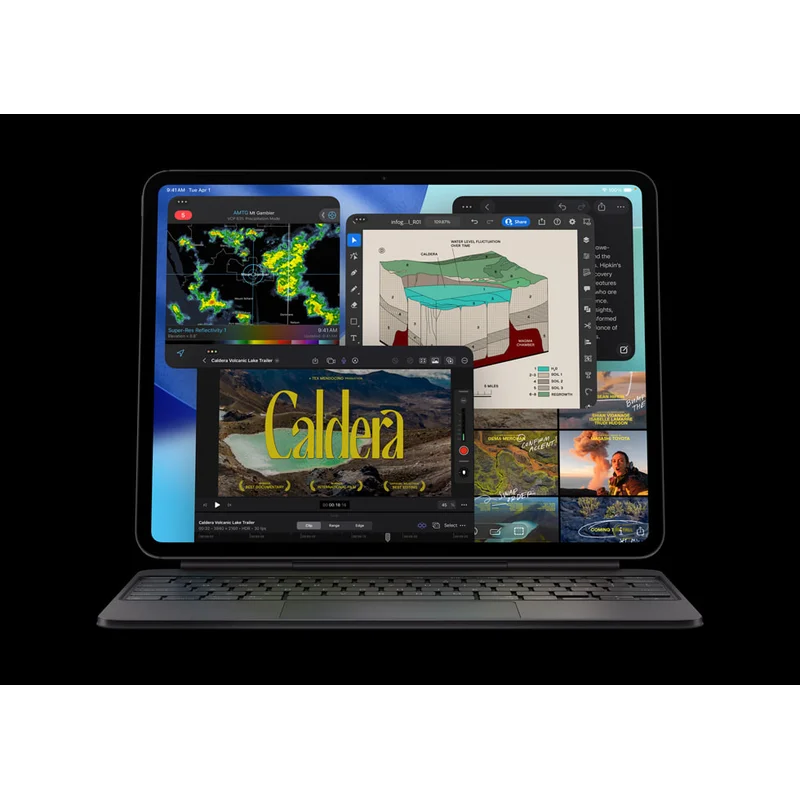
iPad Pro 13" M5
The benchmark every tablet is measured against. Tandem OLED is the prettiest screen on any tablet ever. Apple Silicon M5 means it runs Final Cut Pro and Logic Pro natively. The catch is the price: by the time you add Magic Keyboard ($579) and Apple Pencil Pro ($229), you have spent $3,000.
RefDat Score Breakdown
| Signal | Score | Weight | Details |
|---|---|---|---|
| Verified Buyer Rating | 4.7/5 (1240 reviews) | 30% | Consumer consensus from verified-purchase buyer reviews |
| Community Sentiment | 4.6/5 | 25% | Editorial assessment from OzBargain, Whirlpool, ProductReview |
| Value Score | 4.3/5 | 20% | Premium price, and the Magic Keyboard ($579) and Apple Pencil Pro ($229) push real cost to nearly $3,000 |
| Safety Record | 5.0/5 | 10% | No active ACCC recalls |
| Recency | 5.0/5 | 5% | Released 2025-10-21 |
Last evaluated: 25 Apr 2026
Pros & Cons
What I Like
- Tandem OLED at 1,000 nits sustained / 1,600 nits HDR peak is the prettiest display on any tablet ever made
- M5 chip means desktop-class performance for Final Cut Pro, Logic Pro, Procreate, and pro creative apps
- ProMotion 120Hz with Apple Pencil Pro is the closest digital drawing has come to actual paper
- Thunderbolt 4 (not just USB-C) for fast external storage and pro display output
- 5.1mm thickness with magnesium chassis is the most premium tablet build money can buy
Could Be Better
- Magic Keyboard ($579) and Apple Pencil Pro ($229) are essentially required to use the iPad Pro as intended; total cost climbs to nearly $3,000
- iPadOS 19 still has annoying limitations versus macOS for pro work (windowing, file management, plugin support)
- 256GB base storage is tight for a $2,199 device that stores video and Procreate files
- Battery is 10 hours, less than the 18 to 20 hours a MacBook Air or Surface Laptop now delivers
My Review
The iPad Pro 13-inch M5 is the tablet every other tablet is measured against, and in 2026 nothing else is genuinely competing for the same job. The combination of tandem OLED at 1,000 nits sustained brightness, Apple Silicon M5 with desktop-class performance, ProMotion 120Hz refresh, Apple Pencil Pro support, and Thunderbolt 4 connectivity is the spec sheet that defines the upper limit of the tablet category.
The tandem organic LED (OLED) display is the headline. Two OLED layers stacked, full DCI-P3 colour gamut, 2,752 by 2,064 resolution, ProMotion 120Hz with variable refresh down to 10Hz on static content. In a dark room watching high dynamic range (HDR) content, this display is genuinely better than any TV under $5,000. For digital artists working in Procreate, the colour accuracy and the response time make this the closest a screen has come to actual paper. For photo editors using Lightroom on iPad, the per-pixel control of OLED reveals shadow detail that liquid crystal display (LCD)-based tablets cannot show.
The M5 chip is overkill for casual tablet use. For pro creative apps, it earns its keep. Final Cut Pro for iPad runs full 4K timelines without compromise. Logic Pro for iPad runs sessions with 50-plus tracks and a moderate plugin chain. DaVinci Resolve for iPad (released 2025) does basic colour grading and edit work that would have required a desktop two years ago. Procreate handles 16K canvases at 60fps. The chip is the same M5 in the MacBook Pro 14, and most pro workloads on iPadOS use it efficiently.
The hidden costs are the real value question. The Magic Keyboard for iPad Pro M5 is $579 in Australia and is essentially required if you intend to do serious typing. Apple Pencil Pro is $229 and is required if you intend to use the iPad as a drawing or note-taking surface. Buying both takes the total cost from $2,199 to $3,007, which puts the iPad Pro deeper into MacBook Pro 14 territory. For pure tablet use without keyboard or pencil, the iPad Pro is overkill; the iPad Air M3 at $999 covers 90 percent of the use cases at less than half the price.
The iPadOS 19 question. Apple has slowly added desktop-class features to iPadOS over the years (Stage Manager, external display support, Safari with full developer tools, Final Cut Pro and Logic Pro native apps), but iPadOS still has annoying limitations versus macOS. Window management is constrained, the file system is limited, professional apps that have desktop equivalents (Adobe Premiere, Avid, Resolve full edition) are either iPad-stripped versions or unavailable. For a buyer choosing between an iPad Pro and a MacBook Pro 14 at similar money, the question is whether you genuinely prefer the touch-first ecosystem or whether you would rather have macOS. Most pro buyers eventually choose macOS; the iPad Pro buyers are the ones who specifically want the touchscreen-and-pencil workflow.
The Australian buyer context. JB Hi-Fi runs the iPad Pro at $50 to $100 below Apple direct routinely. The Apple Education Store at $1,979 is the year-round price for anyone with a school or university.edu.au email. The Good Guys and Officeworks track JB to within $50. Cellular models cost $300 more and are mostly a waste of money in 2026 because every iPhone supports tethering and Apple's hotspot integration with iPad is smooth. AppleCare+ at $199 for 2 years adds genuine accidental-damage cover (drops, spills) that the Australian Consumer Law (ACL) does not give you, and is more compelling on a tablet than on a laptop because tablets get dropped more.
The trade-off versus the Surface Pro 12. The Surface Pro is a $700 cheaper 2-in-1 that runs full Windows 11. If you need x86 software, full file system access, or you live in Microsoft 365 and OneNote, the Surface Pro is the right answer. If you want pure creative tablet work and the macOS-adjacent ecosystem (sync to MacBook, AirDrop to iPhone, Procreate, Final Cut, Logic Pro), the iPad Pro is the right answer. Both are excellent at the job they are built for, and the choice is really about which OS you want.
The trade-off versus the iPad Air M3. The Air at $999 has the same iPadOS, the same Apple Pencil Pro support, the same general form factor, but a regular Liquid Retina LCD instead of tandem OLED, M3 instead of M5, and 8GB RAM instead of 16GB. For 80 percent of buyers (Netflix, browsing, Procreate at moderate canvas sizes, light photo editing, kids, students, casual creators), the Air is the right answer. The iPad Pro 13 M5 is the answer only when you have the budget and the workload that actually uses the tandem OLED, M5, and 16GB.
Specifications
| Chip | Apple M5 (10-core CPU, 10-core GPU) |
| Ram Gb Default | 16 |
| Ram Gb Max | 16 |
| Storage Gb Default | 256 |
| Storage Gb Max | 2048 |
| Display Inches | 13.0 |
| Display Resolution | 2752 x 2064 |
| Display Brightness Nits Sustained | 1000 |
| Display Brightness Nits Peak Hdr | 1600 |
| Display Refresh Hz | 120 |
| Display Technology | Tandem OLED (Ultra Retina XDR), ProMotion |
| Battery Hours Video | 10 |
| Weight Grams | 579 |
| Thickness Mm | 5.1 |
| Ports | USB-C with Thunderbolt 4 |
| Wifi | Wi-Fi 7 |
| Bluetooth | 5.4 |
| Biometrics | Face ID |
| Stylus Support | Apple Pencil Pro, Apple Pencil USB-C |
| Keyboard Support | Magic Keyboard for iPad Pro M5 |
| Connectivity | Wi-Fi only or Wi-Fi + Cellular (5G) |
| Operating System | iPadOS 19 |
Where to Buy in Australia
Looking for the cheapest price in Australia? The figure below is the latest eBay AU price I last resolved on 27 Jul 2026. Amazon does not publish a price through its API yet, so that button opens the listing for you to compare. Prices move often, so check before you buy.
As an Amazon Associate I earn from qualifying purchases.
Under Australian Consumer Law, you have rights to a repair, replacement, or refund if a product has a major problem, regardless of manufacturer warranty. Learn more →
Price History
| Date | Price | Change |
|---|---|---|
| 2026-05-30 | $1454.42 | |
| 2026-05-31 | $2324 | ↑ $869.58 |
| 2026-06-01 | $1530.95 | ↓ $793.05 |
| 2026-06-02 | $1536.51 | ↑ $5.56 |
| 2026-06-03 | $2324 | ↑ $787.49 |
| 2026-06-04 | $2324 | No change |
| 2026-06-05 | $2324 | No change |
| 2026-06-06 | $2324 | No change |
| 2026-06-07 | $2324 | No change |
| 2026-06-08 | $1985.68 | ↓ $338.32 |
| 2026-06-09 | $1986.23 | ↑ $0.55 |
| 2026-06-10 | $1996.44 | ↑ $10.21 |
| 2026-06-11 | $2003.48 | ↑ $7.04 |
| 2026-06-12 | $1996.56 | ↓ $6.92 |
| 2026-06-13 | $1995.49 | ↓ $1.07 |
| 2026-06-14 | $1995.49 | No change |
| 2026-06-15 | $1995.49 | No change |
| 2026-06-16 | $1989.34 | ↓ $6.15 |
| 2026-06-17 | $2324 | ↑ $334.66 |
| 2026-06-18 | $1987.98 | ↓ $336.02 |
| 2026-06-19 | $2221.93 | ↑ $233.95 |
| 2026-06-20 | $2324 | ↑ $102.07 |
| 2026-06-21 | $1979.42 | ↓ $344.58 |
| 2026-06-22 | $1979.42 | No change |
| 2026-06-23 | $1985.10 | ↑ $5.68 |
| 2026-06-24 | $1908.82 | ↓ $76.28 |
| 2026-06-25 | $1908.03 | ↓ $0.79 |
| 2026-06-26 | $1909.02 | ↑ $0.99 |
| 2026-06-27 | $2007.85 | ↑ $98.83 |
| 2026-06-28 | $1914.06 | ↓ $93.79 |
| 2026-06-29 | $1650.88 | ↓ $263.18 |
| 2026-06-30 | $2078.99 | ↑ $428.11 |
| 2026-07-01 | $2070 | ↓ $8.99 |
| 2026-07-02 | $2079.84 | ↑ $9.84 |
| 2026-07-03 | $2082.20 | ↑ $2.36 |
| 2026-07-04 | $2058.27 | ↓ $23.93 |
| 2026-07-05 | $2077.43 | ↑ $19.16 |
| 2026-07-06 | $2077.43 | No change |
| 2026-07-07 | $2079.47 | ↑ $2.04 |
| 2026-07-08 | $2082.43 | ↑ $2.96 |
| 2026-07-10 | $2086.15 | ↑ $3.72 |
| 2026-07-11 | $2744 | ↑ $657.85 |
| 2026-07-12 | $2081.63 | ↓ $662.37 |
| 2026-07-13 | $1975.70 | ↓ $105.93 |
| 2026-07-14 | $2083.72 | ↑ $108.02 |
| 2026-07-15 | $1654.34 | ↓ $429.38 |
| 2026-07-16 | $1647.49 | ↓ $6.85 |
| 2026-07-17 | $1806.60 | ↑ $159.11 |
| 2026-07-18 | $2080.11 | ↑ $273.51 |
| 2026-07-19 | $2080.11 | No change |
| 2026-07-20 | $2214.94 | ↑ $134.83 |
| 2026-07-21 | $2072.71 | ↓ $142.23 |
| 2026-07-22 | $1641.66 | ↓ $431.05 |
| 2026-07-23 | $1774.90 | ↑ $133.24 |
| 2026-07-24 | $2247.67 | ↑ $472.77 |
| 2026-07-25 | $2744 | ↑ $496.33 |
| 2026-07-26 | $2744 | No change |
| 2026-07-27 | $2520.28 | ↓ $223.72 |
What Australians Say
Common themes from Australian community discussions (OzBargain, Whirlpool, ProductReview):
iPad Pro 13" M5 is ranked in my Best Tablets and 2-in-1s in Australia list. Not sure what to look for? Read my Tablets and 2-in-1s buyer's guide.
Compare With
As an Amazon Associate I earn from qualifying purchases.