How to Choose a Baby Monitor - Buyer's Guide
Last updated: 12 Apr 2026
Video Quality and Night Vision
Modern baby monitors need clear video in any light. Daytime should be sharp enough to see what your baby is doing. Night vision (infrared) should light up the cot clearly without waking the baby with visible red glow.
Look for 1080p minimum. Cheaper monitors are 720p and look blurry on a phone. Night vision range varies: some see 3 metres, premium units go 8+ metres. For most nurseries, 5 metres is plenty.
Colour night vision (low-light video without infrared) is trendy but uses more battery. Standard infrared is more reliable.
Range and WiFi Reliability
Some monitors use closed-circuit radio, some use WiFi. Radio monitors work only in your home (15-30 metres typical range). WiFi monitors work anywhere, you can check from work or a cafe.
WiFi is more convenient but depends on internet reliability. Your router location matters. Thick walls reduce signal. If your WiFi is dodgy, a monitor cutting out isn't helpful.
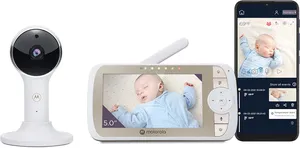
Look for monitors with both WiFi and local radio fallback. If WiFi drops, you can still see the local stream. Motorola VM65 does this well.
Two-Way Talk and Sound Quality
Two-way talk lets you speak to your baby through the monitor. Useful for soothing from another room. Sound quality matters, if it's tinny or distorted, your baby doesn't understand you.
Check both directions: can you hear your baby clearly, and can your baby hear you clearly? Cheap monitors have thin audio both ways. Premium units have decent speakers.
Some monitors have sound-activated alerts (waking cry alerts you). Useful at night. Check if it's adjustable, you don't want false alerts from every whimper.
Pan/Tilt/Zoom Capabilities
Basic monitors point at the cot and that's it. Pan/tilt lets you move the camera left/right and up/down via the app. Zoom helps you see fine detail.
Useful if your cot is in a larger room and you want to see different areas. Not essential if the monitor is aimed directly at the cot. Premium monitors have this; budget units rarely do.
Temperature and Humidity Monitoring
Some monitors have temperature/humidity sensors. Useful for Australian summer heat, you can check the nursery temp before going in. Helps with SIDS prevention (overheating is a risk factor).
Most don't have this. If your nursery gets hot, it's a useful feature. Many you can solve with a separate thermometer instead.
Australian Safety Standards and Sleep Advice
Baby monitors aren't regulated by ACCC, but the nursery itself has safety rules. The monitor shouldn't be in the cot (loose wires, camera mounts). Keep it out of reach, secure any cords. Video only, audio shouldn't be so loud it masks baby sounds.
SIDS guidelines say room-share without bed-sharing for the first 6-12 months. A monitor lets you rest in another room while staying connected. That's the whole point.
Buy from retailers with good return policies. Test the setup before committing, some monitors are finicky about WiFi connection or require fiddly app registration.
My Top Picks
Ready to pick one?
Check out my ranked list with scores, prices, and AU availability.
See the Best Baby Monitors